
Mathias is a writer who is currently obsessed with AI tools and kept postponing the time to write, so now he has forced himself to write and share one thing every week.
Hello Amazing!
This is the long story of how we built a tool at work, that has proven to be really useful for our leaders. It's not revolutionary. It's certainly not perfect. In fact I've been postponing writing this piece because I felt it was perhaps a bit too embarrassing that after six months, this is still the best (and only) truly valid use-case we have found and built an actual solution to. I'm afraid that people more technical than me will respond and say "this is such a convoluted approach, why didn't you just do x instead?" and I won't know how to respond. But on the other hand, I've demoed this (and a few other of the things I've been playing with) to a team of real experienced software engineers, and they told me after that they were very impressed, so here we go.
The TL;DR (For the busy folks)
The problem: We have 270+ HR policies. Leaders struggle to know which rules apply to specific, nuanced employee situations.
The (current) solution: We built a custom AI agent that uses a slightly rigid, verifiable workflow. It doesn't just "guess." It reads policy summaries, selects the relevant policies, extracts exact quotes, and cites its sources before making a recommendation.
The current status: A pilot group of leaders is using it. Feedback is overwhelmingly positive. They have not yet caught it making a mistake.
One big takeaway: Finding narrow, highly specific use cases (and forcing AI to follow strict workflows rather than just treating it as an oracle) is where the real enterprise value lies.
The job to be done
I've mentioned this example before, but just to quickly recap: at Ørsted we have more than 270 different HR policy documents across global and local jurisdictions, covering anything from overall employment terms to alcohol, company cars, parental leave and gender transitions. As a people leader you are expected to navigate this, but of course this isn't trivial. Leaders often ask each other for help, because it's hard to know what applies where, and if none of their peers know, they can open a ticket with HR to get firmer guidance on their situation.
Can AI help?
When we first looked at this, I thought: this is interesting, because it's not about making a chatbot that knows a little bit about nearly everything and can wax poetic ad infinitum. It's a clearly bounded corpus of policy text, and some situations will be governed by policies, and some situations will not. As a leader, it's not enough to get a recommendation that is generally based on the policies, because you are ultimately responsible. Leaders should get guidance on which policies are applicable, which specific sections, and generally feel confident that they will get an answer based on a thorough reading, that doesn't miss some small but significant detail, and never get a made up answer that sounds plausible but isn't actually based on policy. What I liked about this, is that I could easily imagine other parts of the business where we would have a similar need-pattern, even if the content of the documents would be different. For example with contracts.
Where are we now?
Right now we have a total population of four leaders who have a working version of the tool installed on their machines, and who are using it. They use it for themselves, but also run queries based on questions from peers who ask in their shared forums. The feedback is overwhelmingly positive. The leaders are really happy to see that there are questions that it can't answer, because it's not covered by our official policies. They have not yet caught it make a mistake. We are in dialogue with HR to see if they want to adopt the tool and help ensure quality.
How does it work?
In the current form, the tool is built as a custom agent that can run inside Github Copilot inside VS Code. The custom agent has some overall instructions, it has a catalog of the policies, and it has two custom tools that run as a little MCP server, which the agent uses as part of the workflow.
When the user asks for guidance on a situation, the agent does the following:
First it looks at a catalog of all the 270 policies, where each policy has a short summary of what that policy covers (not what the policy is). For example the summary will say "this policy covers the terms around company cars, when they are offered, and what happens when an employee leaves the company" instead of "company cars are offered to senior leaders. Upon termination, employees must hand the car back." (these are illustrative examples). The point of this is that the summary should never substitute for reading the actual policy.
All the summaries combined are still short enough to fit inside the context window of most modern LLMs.
The model uses the summary document to decide which policies are most likely to be relevant for this situation. If the model decides that a policy is likely to be relevant it must use the MCP tool to add that policy to a "reading list". This reading list tool requires that the agent states the reasoning for why it believes this policy to be relevant and what it will specifically be looking for when it reads.
Once the model has added several policies to the reading list, it will put the summaries away, and now it can request to see the full policy text from an item on the reading list.
When reading the policy it receives an easy to digest markdown document, with clear page number references to the original PDF document from our internal Sharepoint. This makes it faster and easier for the model to read. Whenever it finds a passage that it believes to be relevant for the situation, it can save that section as a quote, using the MCP server's citation tool. This tool requires the model to give the exact quote it wants to save, and the reasoning of how it applies to the situation. The MCP tool has full access to the policy text, and will check if the quote matches the document.
Once the model has saved the most important quotes from the policy, it can mark it as "done" on the reading list tool. In order to do this, however, it has to say how the quotes it found compare to what it was looking for and expecting to find.
Only when quotes have been saved and all items on the reading list have been marked complete, is the agent allowed to provide a recommendation to the situation and pass it to the user along with the full list of quotes.
The user can verify the logic of the reasoning at every step. Does it make sense that the answer is based on these selected policies? Do these quotes make sense?
In all of our own testing and now also with users, this approach has proven to produce accurate results reliably.
How did we actually build this? (the long part)
Most things can look rather obvious in hindsight, but when we were starting out, this was much more messy. I had an assumption that in order for the agent to work effectively, I needed to get the actual policies out of our SharePoint site. I didn't know how many policies there were, I just knew the site and that there were sub pages for each country. I could have spent days trying to do it manually, but I also assumed that these might change at any time, so I would rather have some automated way to pull them out and to check if anything had changed since last time. This alone was a problem that took some time, but I managed to get an initial batch of policies pulled out, so I could start experimenting with the behavior of an agent.
At first I really had no idea how it should do it. I just knew that I wanted it to be able to work through the entire catalog of policies and find the most relevant bits, and I described this to the coding agent (GitHub Copilot) I was using. It asked me a lot of clarifying questions and I tried to answer, but I also got impatient, and I often didn't really understand the difference it might make anyway. So eventually it just built something. It was far from clear to me what it was doing exactly and even if it produced some answer, I couldn't explain to anyone how it was getting there.
My first insight was that explainability matters. Even if this approach would eventually work, I needed to also be able to explain how it works. Otherwise how would anyone trust it? So I scrapped the initial approach and tried to describe the pattern of behavior I wanted. At first, the agent was forced to follow very fixed steps: look at the summaries. Pick 5 policies. Read each. Find quotes. Final answer. It wasn't convincing. Later I tried an approach where the agent was given a recommended approach and a lot of freedom to solve the task. But then it started skipping steps and finding shortcuts.
Eventually, I found the approach that is still the foundation of it, where the agent isn't forced to take any particular step, but it IS forced to use the supplied 'tools' (the reading list tool and the citation tool).
In order to see how the agent was solving the task, we built a custom UI. It had a simple three column layout: on the left, a box to put in the situation you want guidance on. In the center, space for the final recommendation incl. sources and quotes. And on the right a step-by-step trace of the actions taken by the agent. We also made sure the agent produced log files that could be analyzed later. But looking at the UI was very insightful. We could see that the agent always started with the policy catalog, and it could select policies. But sometimes it couldn't find any relevant policies, and we realized that our pipeline for sucking the policies out of Sharepoint hadn't found all the policy documents. So we could go back and revise. Later we found that it couldn't always tell from the titles of the policies which policies were most relevant, so we added summaries. But at first these summaries contained highlights of the main policy elements, which meant the agent would jump to a conclusion based on the summary alone, and never actually read the policy in full. So we made the summaries into summaries of the coverage, not the content.
At one point the agent was reading one of our handbooks. After it was done, it concluded that it didn't find any of the answers it was looking for, because the handbook was redacted. Strange. Upon further investigation, the original source PDF didn't contain any text, but was instead 40 pages of photos of pages of text. We needed a mechanism to ensure that the actual content of the PDFs would be reliably extracted, also in edge cases like this. This is something that our M365 Copilot can't handle. It can find this handbook and it can make qualified guesses about what it contains. But because the text is hidden inside images in the PDF, Copilot can't actually read the text, no matter how you prompt it. One could argue that this is less of a problem with Copilot and more of a problem with the PDF, which I partially agree with. However, if AI only works when the world and all data is already perfectly organized and structured, then AI isn't nearly as helpful. All the mess and all the edge cases will still have to be handled by humans.
Anyway, back to the story. We got into this iterative loop where the agent got better, and we became aware of limitations in the data the agent had. Then we improved the data pipeline, and saw the agent work better. Then we discovered some agent behavior we didn't like, and we adjusted the agent. Policies had inconsistent file names, some were clearly stated as "global", others weren't. We also wanted to ensure that all these local policy copies were linked back to the original PDF on Sharepoint. Back and forth. Better agent. Better data pipeline. Better data.
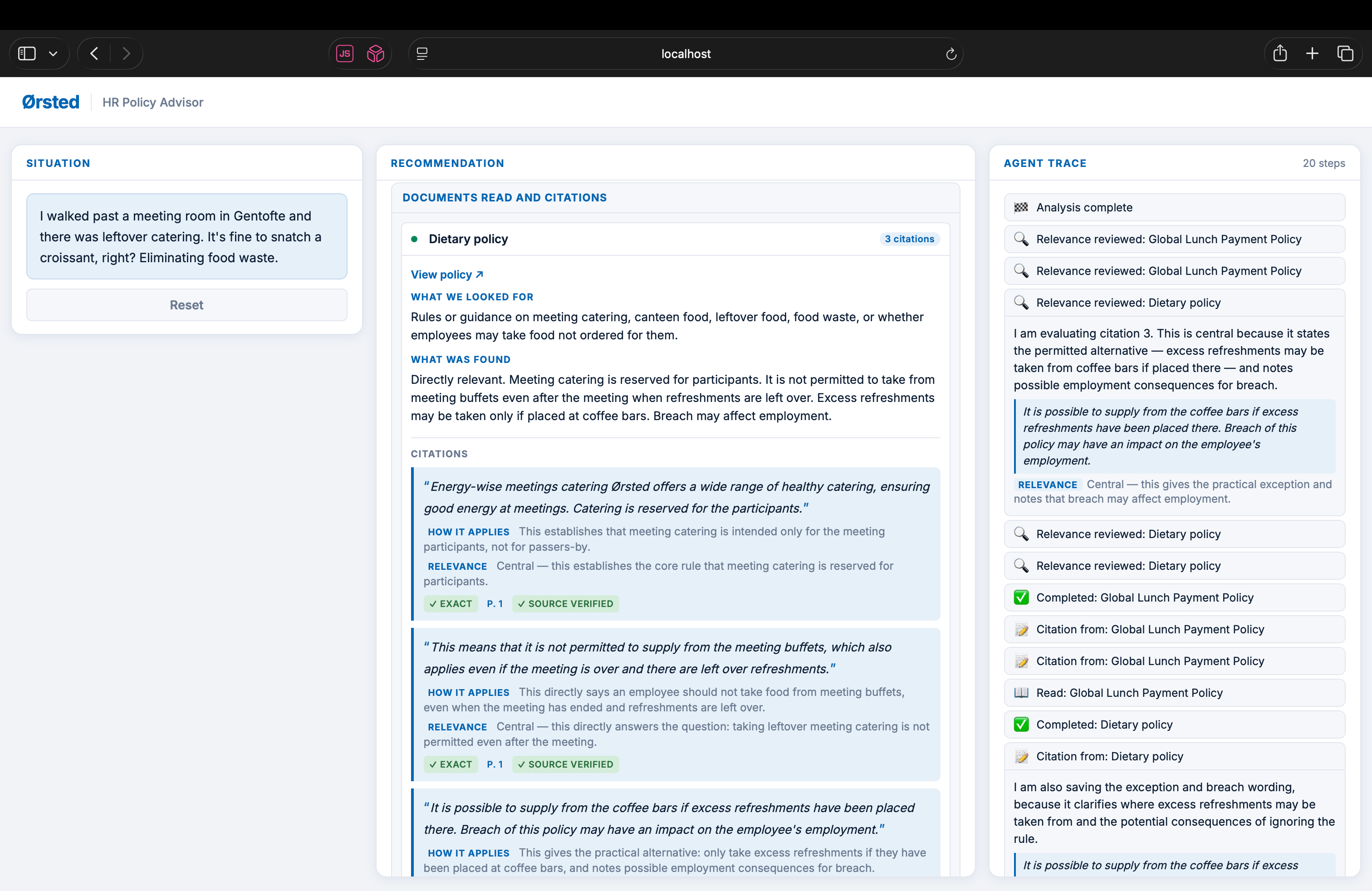
I'm still quite proud of the UI, because it breaks with the standard chatbot interface of all modern AI systems. It's both simple and at the same time it gives transparency into how the work gets done. It holds fixed the actual query (instead of it disappearing up as the agent writes out a long response), it holds fixed the final output, and it shows the steps. Building this as a standalone tool was instrumental for us in our learning journey towards quality. And the users we showed it to really liked it too.
Unfortunately our company doesn't have any easy way to deploy a small web app like this internally. Not even as a demo or proof of concept. So for months we could only run it locally on my machine and demo it to people in meetings. But we wanted to get it out to real users, because we knew that there is a huge difference between a POC and something that users actually use.
Almost everyone has access to M365 Copilot, so now that we had gotten the data out of Sharepoint, we tried to make a simpler agent that could work inside Copilot. Copilot only handles 20 source files so we couldn't give it all 270 policies at once. But we tried making a Denmark-only agent with all the DK and global policies. We tried bundling some policies into longer text files to stay within the file limits. We tried so many workarounds. We knew it would never be as good as the standalone agent we had built, but it was worth exploring. To test quality of the answers, we built a separate version of the main agent, intentionally designed to look for tricky cases, in order to try to fool the M365 Copilot into giving wrong answers. Copilot seemed to give good answers, but because of all the limitations we just couldn't get it to produce anything like the quotes and references. Eventually we gave up. It was too much compromise from the start. But maybe if Copilot gets up to 40 or 50 documents instead of 20, it would be worth testing again.
Finally we heard that the internal effort to build a better AI ecosystem was pointing to a future where employees will have an actual agent harness on their machines, just like GitHub Copilot or Claude Desktop. We don't know what it's going to be, but we were told that the harness would support custom agents, skills and MCP tools. And because we already have access to GitHub Copilot internally, we would be able to test a setup like this, long before the new AI ecosystem would be ready. So we finally let go of the standalone UI, and instead we adapted our custom agent scheme to be an agent inside GitHub Copilot. At first this seemed easy. But it turned out that the agent builder had also been extremely lazy, simply putting in the agent instructions that it should "do it the same way as the standalone agent does," but without further explaining what that is, or making the reading list or citation tools. But with a bit more of tinkering we got it to work for real. I also tried adding a feature that logs the queries and results, but I am not 100% sure that this actually works. This is the version that users currently have, and so we come back to where we started.
Criticism
I will readily admit that I am proud of this. I've not seen others do things of a similar quality around the company, and the solution really does seem to work for the users. That said, I am also critical of it, and I have many thoughts about how it could be improved.
I think it's likely "over built", meaning that forcing the agent to take all these elaborate steps, is likely making it highly inefficient. It will use more steps, more tokens and take longer to get to an answer, than what might be needed. If the model is sufficiently smart, it might be able to come up with a more effective strategy for searching the policies, finding what's relevant and getting to the result. But it can't do that, because we force it to follow the same process every time (look at the summaries, decide what to read, read in detail and save quotes, and then produce a recommendation).
Before scaling this, it will be relevant to setup a much more quantitative test suite with a set of highly difficult situations, and then test and compare how our approach compares to a model that is given more freedom to find its own way. The risk is that it makes the solution more dependent on the model being smart enough, which we don't know if it will be consistently.
Because our approach forces the model to take a lot of small steps, it could also be relevant to evaluate if our process can be followed by a smaller and thus much cheaper and faster model, without loss of quality. I suspect this could be the case, since the first solution was built back in the early spring when the best available model we had was GPT-5.2, and it was plenty good already.
What if policies change?
A real problem of the current version is that it runs on a local cache of the policies. This is what our data pipeline produces, and this is where we handle the PDFs with images inside, bad filenames, unclear jurisdictions etc. But it also disconnects from the real source. If there is a new policy or an update to an existing policy, we need to run the data pipeline again to discover it, update the local cache and trigger an update for all users. This is a real problem, but perhaps practically less of a problem for now. In the early version of the tool we built a hash-check mechanism that could verify a hash of the source PDFs against the sharepoint source links, which would discover a mismatch. While policies do change, they generally don't change daily or weekly, and not without any notification.
It's not solving the real problem.
Several people we showed this to said (rightly) that maybe the real problem is that we have 270+ policies in the first place. Instead of throwing AI at something that humans can't comprehend, what if we spent the time to clean up, simplify and improve the policy catalog? I think that would be amazing. But I also think that even the best clean up effort would still leave our leaders with more policies than you can readily handle. I think we still need both.
Conclusion and wrap up
This has been a really long and detailed walk through of what I've spent the past many months on. To me, it's still technically a bit underwhelming. When I show it, I expect people to go "is that it?" But I have also seen just how many hoops we had to jump through. How many obstacles came up. And how the AI landscape changed around us, both internally and externally. However, the thing I'm left with is this: the actual use-case of AI (specifically a controlled mix of a good enough LLM that can compare a situation with policy text, and a structured workflow with some strict checks on citations) for this problem, has endured. Every single leader we mention it to, has asked when they can get it. But despite having access to many different AI tools, nobody else in the company has tackled it yet.
For me there are two main take-aways:
It's worth investing time and effort to find the really worthwhile use-cases, that are narrow and specific enough that users understand what problem they solve (as opposed to just broadly asking people to use AI).
There is a space for things beyond the single prompt, where AI plays a part in a longer workflow, and that designing and testing these workflows requires some tinkering.
Thanks for reading along.
With love,
—Mathias


